 Purple Sector
Track day telemetry for beginners
What to record on a track day, then how to read it: the lap list, the time gap, speed at each corner and the optimal lap. One change per session.
Start with a GPS lap timer that records at least 10 times a second; a phone app with an external receiver or a RaceBox is enough. After each session, compare your best lap with a typical one, find where the time gap grows, read your speed there, and take one change into the next session. Brake and throttle findings need a logger that records them.
Purple Sector doesn’t make loggers. It opens the files they record. Purple Sector has no commercial relationship with any brand on this page.
What should I record with?
Prices checked 23 October 2026.
| Phone app + external GPS | GPS logger (RaceBox Mini S / Micro) | Lap timer with a screen (AiM Solo 2) | Logger with car data (AiM Solo 2 DL) | |
|---|---|---|---|---|
| GPS rate | Up to 25 Hz with a RaceBox; TrackAddict states 20 Hz | 25 Hz | 25 Hz | 25 Hz |
| Price | App A$14.99 to A$44.99, plus the receiver | Mini S US$289, Micro US$129 (sale; RaceBox says valid for Australia) | A$769.95 (AU dealer) | A$1,340 incl. tax (AU dealer) |
| Records | Lap times, GPS speed and line; OBD-II engine data in RaceChrono Pro, TrackAddict and Harry’s | Lap times, GPS speed and line | Lap times, GPS speed and line, acceleration | Adds the car’s own ECU data over CAN, RS232 or K-Line |
| Can’t show | Brake pressure or steering angle | Brake, throttle or steering | Brake, throttle or steering | – |
| Compared on | Lap timer apps | Catalyst vs RaceBox vs Solo 2 | Catalyst vs RaceBox vs Solo 2 | Catalyst vs RaceBox vs Solo 2 |
Phone app + external GPSApp A$14.99 to A$44.99, plus the receiver
- GPS rate
- Up to 25 Hz with a RaceBox; TrackAddict states 20 Hz
- Price
- App A$14.99 to A$44.99, plus the receiver
- Records
- Lap times, GPS speed and line; OBD-II engine data in RaceChrono Pro, TrackAddict and Harry’s
- Can’t show
- Brake pressure or steering angle
- Compared on
- Lap timer apps
GPS logger (RaceBox Mini S / Micro)Mini S US$289, Micro US$129 (sale; RaceBox says valid for Australia)
- GPS rate
- 25 Hz
- Price
- Mini S US$289, Micro US$129 (sale; RaceBox says valid for Australia)
- Records
- Lap times, GPS speed and line
- Can’t show
- Brake, throttle or steering
- Compared on
- Catalyst vs RaceBox vs Solo 2
Lap timer with a screen (AiM Solo 2)A$769.95 (AU dealer)
- GPS rate
- 25 Hz
- Price
- A$769.95 (AU dealer)
- Records
- Lap times, GPS speed and line, acceleration
- Can’t show
- Brake, throttle or steering
- Compared on
- Catalyst vs RaceBox vs Solo 2
Logger with car data (AiM Solo 2 DL)A$1,340 incl. tax (AU dealer)
- GPS rate
- 25 Hz
- Price
- A$1,340 incl. tax (AU dealer)
- Records
- Adds the car’s own ECU data over CAN, RS232 or K-Line
- Can’t show
- –
- Compared on
- Catalyst vs RaceBox vs Solo 2
A rule of thumb for a first logger: buy one whose files you can open on the computer you already own. RaceBox exports VBO or CSV from its website; AiM’s Race Studio 3 runs on 64-bit Windows only.
After the session: five steps
1. Clean up the lap list
Leave out the out lap, the in lap and any lap with traffic, a spin or a yellow flag. What’s left are the laps you can compare.

2. Pick two laps from the same session
Your best lap is the reference. Compare it with a typical lap, not your worst: a typical lap shows what you do most of the time. Both laps need the same layout and direction.
3. Follow the time gap around the lap
The time gap runs along the lap. Where it climbs, the typical lap is losing time; where it falls, it’s gaining. Note the two or three corners where the gap climbs most.

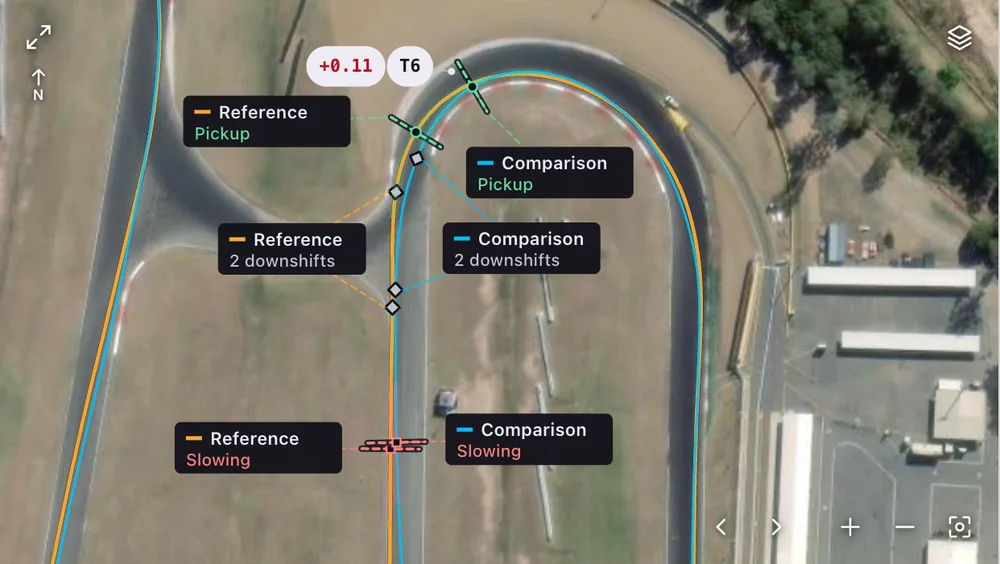
4. Read your speed at those corners
At each of those corners, look at three points on the speed trace:
- where the speed starts to fall (you braked or lifted; GPS alone can’t say which);
- the lowest point, your minimum corner speed;
- how soon the speed climbs again on the way out.
A lower minimum or a later climb out on the typical lap is where the time went.
5. Check the optimal lap, then pick one change
The optimal lap joins your quickest run through each part of the lap into one time. A big gap between it and your best lap means the pace is already there in pieces, and putting it together is the job. Choose the one corner that cost the most and one thing to try there next session, such as braking slightly later or picking up the throttle earlier. Change one thing at a time so the next session’s data can show whether it worked. See optimal lap time explained.
What GPS-only data can’t tell you
A GPS logger records position, speed and time. It doesn’t measure brake pressure, throttle position or steering angle, so a braking point worked out from GPS is an estimate of where the speed started to fall. Purple Sector labels those estimates. To check brake release or throttle application, use a logger that records those channels. See what GPS data can and cannot tell you.
Mistakes to avoid
- Compare the same course. The same circuit run the other way, or a short layout, is a different course.
- Treat small line differences with care. GPS position is less exact than GPS speed, and a line difference smaller than the recording’s noise isn’t a change in driving.
- Change one thing at a time. If you change three things and the next session is quicker, you won’t know which change did it.
- Check more than one lap. Look for the same loss on several laps before acting on it.
How Purple Sector fits
Open the file from your logger in a browser on a Mac, PC or phone: the laps, the gap at every turn, speed traces, the optimal lap and a corner table. It opens with no account and isn’t uploaded. A free account saves sessions and includes one AI debrief, which names the corner that cost the most and one thing to try there. More debriefs come from packs (10 for A$5.90, 20 for A$9.90, 40 for A$12.90) or Coach (A$19 a month or A$190 a year). Prices as of 23 October 2026.
Questions
Do I need a data logger for my first track day?
No. A phone lap timer gives you lap times and a GPS trace to learn the track. A logger that records 10 times a second or more is worth adding once you want to compare corners between laps.
What should I look at first in my lap data?
The time gap between your best lap and a typical lap. It shows which corners cost time, and that tells you where to read the speed trace.
Can telemetry tell me where to brake?
It shows where your speed started to fall on each lap, and how that compares with your best lap. With GPS only, that point is an estimate; a brake pressure channel measures it.
How many laps do I need to compare?
At least two clean laps from the same session and layout. More laps make it easier to tell a repeated loss from a one-off.
Will telemetry make me faster?
It shows where your laps differ. What you change on track, and how the day goes, decides the lap time.
More: How to compare laps · Lap timer apps compared · Motorcycle lap timers compared · Which file to bring · Pricing
Sources, checked 23 October 2026
- RaceBox Mini S: 25 Hz; US$289 on sale, US$319 normally, valid for Australia: racebox.pro/products/racebox-mini-s
- RaceBox Micro: 25 Hz; US$129 on sale, US$139 normally, valid for Australia: racebox.pro/products/racebox-micro
- RaceBox exports CSV, VBO and GPX from its website: racebox.pro/info/session-export
- Phone apps A$14.99 to A$44.99; up to 25 Hz with a RaceBox; TrackAddict states 20 Hz; OBD-II in RaceChrono Pro, TrackAddict and Harry’s: purplesector.dev/guides/lap-timer-apps-compared
- AiM Solo 2: 25 Hz on four constellations; lap and sector times, position, speed, acceleration: aim-sportline.com/en/products/solo2-solo2dl/index.htm
- AiM Solo 2 DL adds ECU data over CAN, K-Line or RS232: store.aim-sportline.com/en/lap-timers/37-solo-2-dl.html
- Solo 2 A$769.95 at an Australian dealer: superbikesupply.com.au/products/aim-solo-2-gps-lap-timer
- Solo 2 DL A$1,340 incl. tax at an Australian dealer: tasautosport.com.au/products/solo-2-dl-gps-lap-timer
- Race Studio 3 on 64-bit Windows only: aim-sportline.com/en/sw-os-compatibility-table.htm
- Compare with your best lap; a lower minimum means time lost on entry or mid-corner: harrisraceradios.com/pages/how-to-read-mychron-data
- Where the time gap rises the compared lap loses time; the same length the other way is a different course: purplesector.dev/guides/compare-laps
- GPS-only recordings have no measured brake, throttle or steering; estimates are labelled; line differences against noise: purplesector.dev/guides/gps-data
- Opens with no account and is not uploaded; a free account saves sessions and includes one AI debrief: purplesector.dev/llms.txt
- Packs 10 for A$5.90, 20 for A$9.90, 40 for A$12.90; Coach A$19 a month or A$190 a year: purplesector.dev/pricing