 Purple Sector
How to read MyChron data
Read a MyChron session in six steps: lap times, the time gap, the speed trace, minimum corner speed, RPM and water temp. Works on Mac or PC, in a browser.
To read MyChron data, start with the lap list, pick your best lap and one typical lap from the same session, then follow the time gap between them around the track. Where the gap grows, compare the speed traces: braking point, minimum corner speed and how early the speed climbs again. RPM and water temp come last.
What do I need?
- The session file from your MyChron 5, 5S or 6: an
.xrk, or the compressed.xrz. See getting the file off a MyChron. - A browser on a Mac or PC. The same steps work in AiM’s Race Studio 3 on Windows.
The screenshots below are a MyChron 5 session from a car at Queensland Raceway. The steps are the same for a kart.
1. Which laps can I compare?
Check the lap list first. Find the out lap, the in lap and any lap with traffic or a spin, and leave them out. What’s left are the laps you can compare. If the logger recorded the whole session as one lap, the finish line wasn’t set; place the timing point on the trace and the laps split.
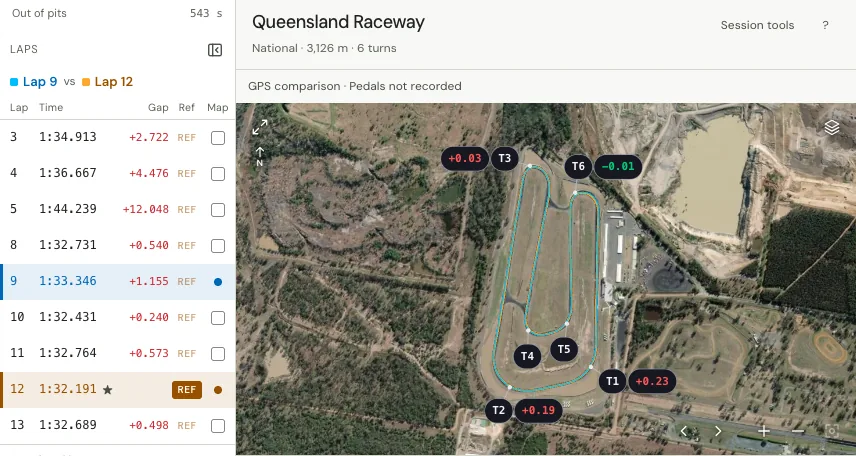
2. Which two laps?
Use your best lap as the reference and one typical lap from the same session to compare with it. A faster driver’s lap is useful too, but different conditions can make a correct comparison a poor driving reference.
3. Where is the time going?
Follow the time-gap trace (AiM calls it Delta T) along the lap. Where it climbs, the typical lap is losing time; where it falls, it’s gaining. Focus on the corners where it keeps climbing.
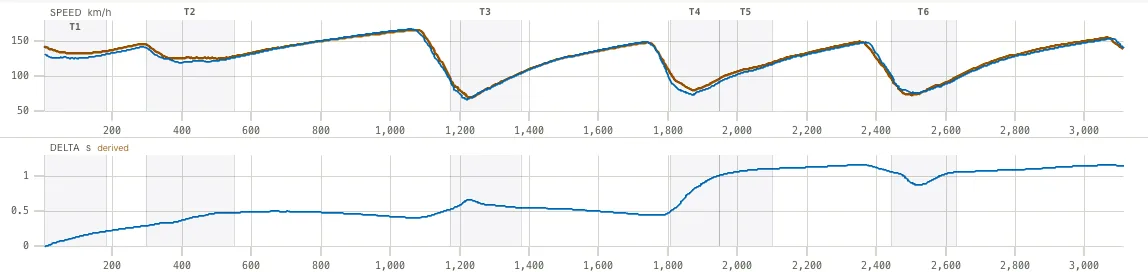
4. What does the speed trace show at those corners?
Read speed against distance, left to right, for three things:
- Where the speed starts to fall: where you braked or lifted. Speed alone can’t tell which.
- The lowest point: the minimum corner speed.
- The climb out: the exit speed.
A lower minimum speed on the typical lap means time lost on entry or mid-corner.
5. What does the corner close-up add?
Tap a corner on the map to zoom into it: both GPS lines through it, where each lap slowed and picked up, and the speed range of each lap there. The Corner times tab lists every corner lap by lap, timed from turn-in to exit. Treat a small difference between the two lines with care: GPS position is less exact than GPS speed.
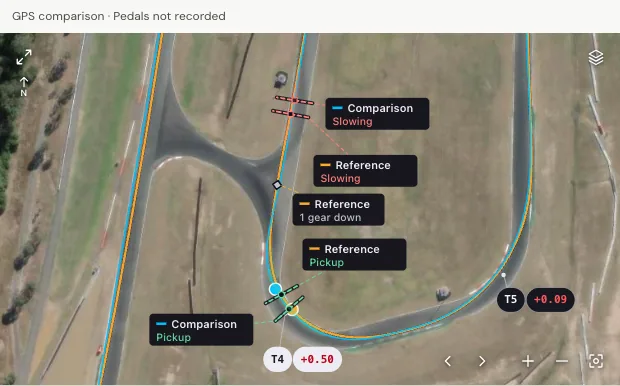
How accurate is the line on the map?
Receiver noise, rounding, gaps and bad fixes can move points between laps with no change in driving, so read small line differences with care. Purple Sector only reads a line difference as a driving change once it is larger than the measured noise for that recording. More in What GPS data can and cannot tell you.
6. What about RPM and water temp?
Look at them last, after the speed trace.
- RPM: the RPM trace is mostly used for gearing. Hitting the limiter at the end of a straight, or bogging out of a slow corner, are the two signs drivers look for.
- Water temp: the sensor measures coolant temperature. A steady rise through the session points to marginal cooling; a sudden spike points to a problem.
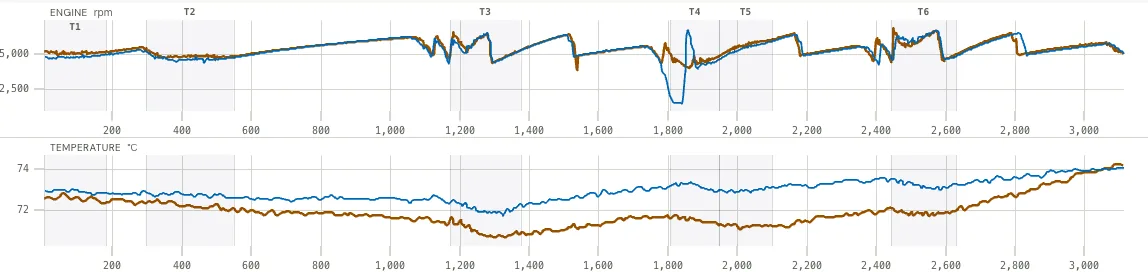
What a temperature channel can’t tell you
A temperature channel shows the number the sensor reported. The channel doesn’t establish whether the sensor measures water, exhaust or cylinder-head temperature, so check where yours is fitted. No alarm limit is assumed.
Can I try it on a sample first?
Open the public sample and follow the same steps. It is a car session recorded on a VBOX at Norwell, so you can try steps 1 to 5 on it; it has no water-temp channel. The Norwell worked example walks through one speed window in detail.
Questions
Can I read MyChron data without Race Studio?
Yes. Open the session’s .xrk or .xrz in Purple Sector in a browser, on a Mac or PC. Getting the file off the logger is a separate step: Race Studio 3 on Windows, or Purple Sector Link over the MyChron’s own Wi-Fi. See Race Studio 3 on a Mac.
What is a good minimum corner speed?
There is no single number. It depends on the corner, the kart class, the tyres and the conditions. Compare your minimum speed with your own best lap at the same corner on the same day, then with a faster driver in the same class.
What does Delta T mean on a MyChron?
It is the running time difference between two laps along the lap. Where it rises, the compared lap is losing time to the reference; where it falls, it is gaining.
Why does my MyChron show one long lap?
The logger had no finish line set for that track, so it didn’t split the session into laps. Set the finish line in Race Studio, or place the timing point on the trace in Purple Sector, and the laps split.
More: Kart data loggers compared · How to compare laps · Ipswich Kart Club track map · MyChron software and apps · Optimal lap time
Sources, checked 23 October 2026
- MyChron 5, 5S and 6 save sessions as .xrk, .xrz is the compressed copy, and Purple Sector opens both: purplesector.dev/guides/mychron-aim-xrk-files
- Race Studio 3 is AiM’s analysis software: aim-sportline.com/docs/racestudio3/manual/html/analysis.html
- A session recorded as one long lap means no finish line was set: forums.kartpulse.com/t/mychron-5-tutorial-help/3805
- Compare with your best lap or a faster driver; a lower minimum means time lost on entry or mid-corner; Delta T; RPM for gearing; water temp rise and spike: harrisraceradios.com/pages/how-to-read-mychron-data
- The water temperature sensor measures coolant temperature: harrisraceradios.com/pages/water-temp-not-reading
- Line differences are read as driving only once larger than the recording’s position noise: purplesector.dev/guides/gps-data
- The public sample is a Norwell car recording from a Video VBox Lite, with AI disabled: purplesector.dev/guides/norwell-lap-comparison