 Purple Sector
Race Studio 3 on a Mac
Race Studio 3 runs only on 64-bit Windows. On a Mac, use Windows on an Intel Mac, a Windows PC, or open MyChron and AiM .xrk files in a browser instead.
Race Studio 3 has no Mac version. AiM supports it only on 64-bit Windows, on an Intel-type (x64) processor. An Intel Mac can run it in Windows through Boot Camp or a virtual machine. On an Apple silicon Mac (M1 and later), Windows runs in its Arm version, and AiM doesn’t support Race Studio 3 on Arm Windows. To just look at your laps, open the .xrk file in a browser.
Which Mac do I have?
Apple menu → About This Mac. "Chip: Apple M…" is Apple silicon. "Processor: … Intel" is an Intel Mac.
What are my options?
| Option | Mac it suits | Cost (as of 23 Oct 2026) | Downloads from the logger? | Supported by AiM? |
|---|---|---|---|---|
| A Windows PC or laptop | Any | The PC | Yes, Wi-Fi or USB | Yes (64-bit Windows 7 to 11) |
| Boot Camp (Windows on the Mac itself) | Intel only | Windows licence | Yes | Yes, it’s Windows x64 |
| Parallels or VMware running Windows | Intel | Parallels Standard A$115 a year (A$63.25 on sale) | Yes; AiM’s MyChron 6 guide gives Parallels Wi-Fi steps | Yes, AiM says virtual machines can be used |
| Parallels running Windows 11 on Arm | Apple silicon | As above | Unlikely, AiM says | No: AiM doesn’t support Windows on Arm |
| A cloud PC (e.g. Windows 365) | Any | From A$52.40 per user a month ex GST | Not tested; the logger’s Wi-Fi is local | Not stated by AiM |
| Open the file in Purple Sector | Any | Free to open and compare | Via Purple Sector Link (Wi-Fi), below | It doesn’t replace Race Studio |
What about CrossOver?
CodeWeavers' CrossOver runs Windows programs on a Mac without a Windows installation (from US$74 a year). AiM doesn’t list it as a supported way to run Race Studio 3, and we couldn’t confirm CodeWeavers' current rating for it, so treat it as untested.
What works on an Apple silicon Mac?
Microsoft authorises Parallels Desktop to run the Arm version of Windows 11 on M-series Macs. But AiM says Race Studio 3 isn’t developed for Arm and that, on Arm, communication with the logger is unlikely. So it may not connect to your logger to download or configure it.
- To configure the logger (track maps, sensors, firmware): AiM’s free RaceStudio 3 phone app for iOS and Android, or any Windows PC.
- To analyse laps: open the session file in Purple Sector in Safari or Chrome. Nothing to install.
How do I get the file off a MyChron onto a Mac?
- MyChron 5, 5S or 6 over Wi-Fi: install Purple Sector Link (free, for Mac, Windows and Linux), join the logger’s Wi-Fi, choose Download from MyChron (WiFi) on your dashboard. The session opens in Purple Sector.
- Already have Race Studio on a Windows PC? Download there as usual, then copy the session’s
.xrkor.xrzfrom Race Studio’s data folder to the Mac. - Open the file in Purple Sector. Laps are the logger’s own lap times.
Purple Sector Link: known limits
- Tried with a MyChron 5 on a Mac. It is slow, about 6.5 KB/s, so a long session takes a while.
- Not yet tried on a real logger from Windows or Linux.
- Safari can’t talk to Link directly, so Link saves the file to your Downloads folder and you open it from there. Chrome and Firefox open it straight away.
- The Mac app isn’t notarised yet: macOS asks you to choose Open Anyway the first time.
MyChron 6 USB-C and the Mini USB drive
AiM says a MyChron 6 can be downloaded via cable, Wi-Fi or its optional Mini USB drive. We haven’t checked whether a Mac can read session files straight off that drive, so this guide doesn’t rely on it. If it works for you, open the .xrk it holds.
What do I see once it opens?
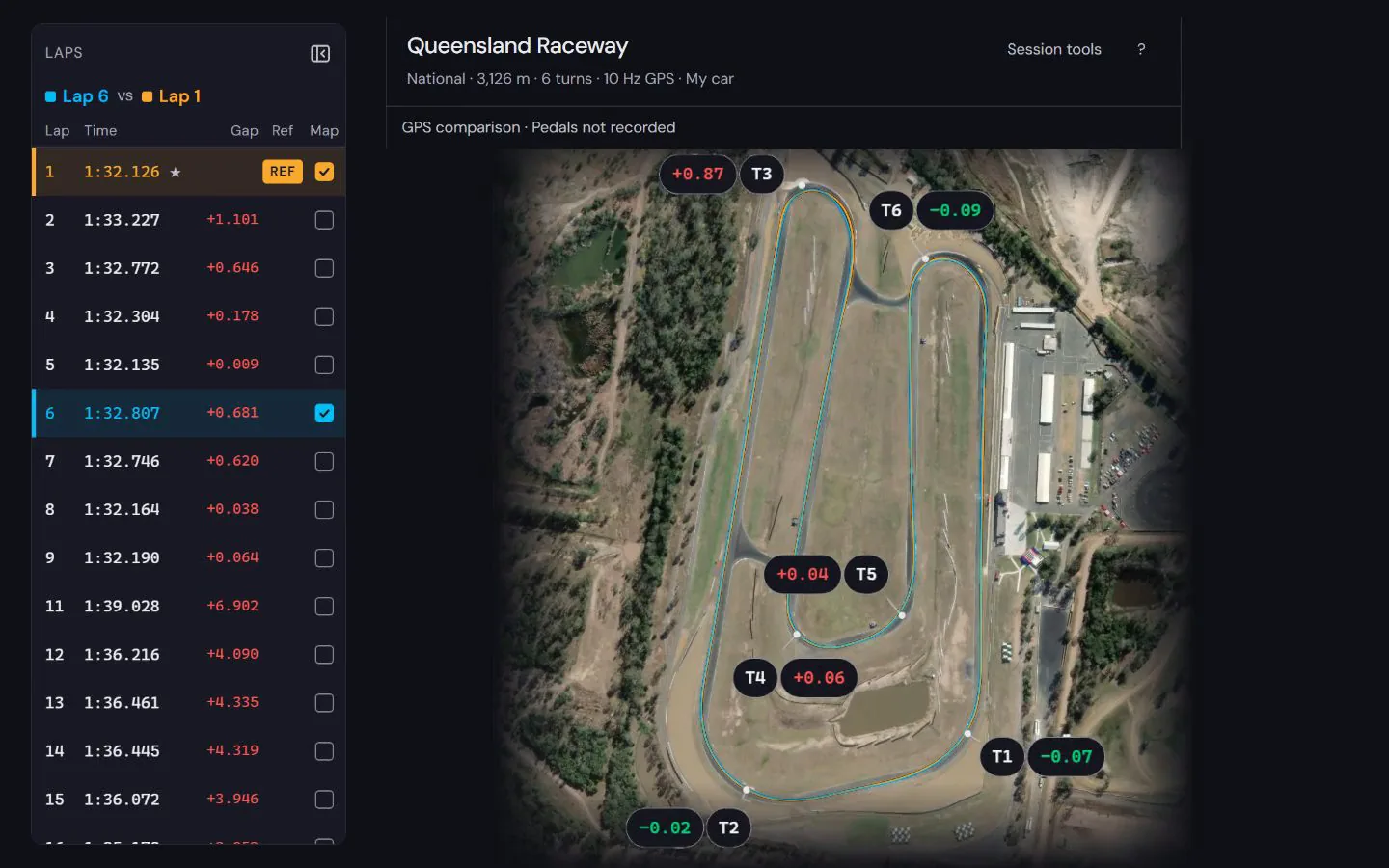
Lap list, the time gap to your best lap at every corner, speed traces, both GPS lines on the map, and RPM and temperature channels as recorded. How to read MyChron data walks through them.
What doesn’t Purple Sector do?
It analyses the file. It doesn’t configure the logger, update its firmware, set up channels or build track maps; use Race Studio 3 or AiM’s phone app for those. Race Studio summary tables don’t open; a Race Studio 2 .drk opens with laps and GPS speed (pick its .gpk too for the map).
Questions
Is there a Mac version of Race Studio 3?
No. AiM supports Race Studio 3 on 64-bit Windows only. AiM’s MyChron guides tell Mac users to run it in a virtualised Windows machine.
Does Race Studio 3 run on an M1, M2 or M3 Mac?
Not in a way AiM supports: those Macs run the Arm version of Windows, and AiM says Arm Windows isn’t supported and communication with the logger is unlikely. A Windows PC, or Windows on an Intel Mac, is the route AiM supports.
Can I use Boot Camp?
Boot Camp works only on an Intel Mac: Apple says it needs a Mac with an Intel processor.
Can I download my MyChron over Wi-Fi on a Mac?
Yes, with Purple Sector Link, a free helper app. It has been tried with a MyChron 5 on a Mac and is slow (about 6.5 KB/s). AiM’s own route is Race Studio 3 on Windows.
Is my data uploaded when I open the file?
No. Without an account, the file is analysed in your browser and isn’t uploaded or saved. Signed-in sessions are saved to your account.
More: MyChron and AiM .xrk files · Kart data loggers compared · Which file to export from each logger · MyChron software and apps · AiM Solo 2 software and apps
Sources, checked 23 October 2026
- Race Studio 3 on 64-bit Windows 7 to 11 only; Arm Windows not supported; virtual machines can be used; on Arm, communication with the logger is unlikely: aim-sportline.com/docs/racestudio3/manual/html/faq.html
- AiM develops only for Intel x64, not Arm: aim-sportline.com/en/sw-os-compatibility-table.htm
- Mac users can use a virtualised Windows machine; Parallels Wi-Fi steps: aim-sportline.com/download/doc/eng/mychron6/aim_mychron6_user_guide_en
- Race Studio 3 version 3.84.08: aim-sportline.com/en/sw-fw-download.htm
- Boot Camp needs an Intel Mac: support.apple.com/en-au/102622
- Parallels Desktop Standard A$115.00 a year, A$63.25 on sale: parallels.com/products/desktop/buy
- Parallels authorised for Arm Windows 11 on Apple M-series Macs: support.microsoft.com/en-us/windows/options-for-using-windows-11-with-
- Windows 365 Business from A$52.40 per user a month ex GST: microsoft.com/en-au/windows-365/business/compare-plans-pricing
- CrossOver US$74 for 12 months: codeweavers.com/store
- CrossOver runs Windows programs without a Windows installation: codeweavers.com/crossover
- MyChron 6 downloads via cable, Wi-Fi or Mini USB storage: aim-sportline.com/en/products/mychron6/index.htm
- MyChron 5 and 5S download over Wi-Fi: dwls.aim-sportline.com/doc/eng/mychron5/aim_mychron5_user_guide_104_en
- RaceStudio 3 phone app: parameters, downloads, sensors, track maps, firmware: apps.apple.com/au/app/racestudio-3/id6443408349
- Purple Sector opens .xrk and .xrz as they are; Purple Sector Link downloads a MyChron 5, 5S or 6 over Wi-Fi: purplesector.dev/guides/mychron-aim-xrk-files