 Purple Sector
AiM Solo 2 software and apps
Race Studio 3 is AiM's Solo 2 software, for 64-bit Windows. The other options on a Mac or phone: AiM's app, AimMac, Pushlapp, LapSnap and a browser tool.
AiM’s software for the Solo 2 and Solo 2 DL is Race Studio 3, a free download for 64-bit Windows. It sets up the logger, downloads sessions over Wi-Fi and analyses them. On a Mac, AimMac is a free independent app that downloads a Solo 2 over Wi-Fi. On a phone, AiM’s RaceStudio 3 app, Pushlapp and LapSnap read Solo 2 sessions.
Purple Sector is one of the tools on this page. Purple Sector has no commercial relationship with any other brand on this page.
How do they compare?
Prices checked 23 October 2026 on each vendor’s site or the Australian App Store. A dash means the vendor doesn’t say.
| Race Studio 3 | RaceStudio 3 app | AimMac | Pushlapp | LapSnap | Purple Sector | |
|---|---|---|---|---|---|---|
| Made by | AiM | AiM | Sergey Smirnov (independent) | Inventivor B.V. | LapSnap Inc | Purple Sector (Queensland) |
| Runs on | 64-bit Windows | iPhone (iOS 18+), Android | Mac (macOS 14+), 64-bit Windows 10 or 11 | iPhone (iOS 18+), Android | iPhone, iPad | Browser on a Mac, PC or phone |
| Downloads from a Solo 2 | Yes, over Wi-Fi | Downloads sessions from AiM devices (Solo 2 not named) | Yes, over Wi-Fi (Solo 2, Solo 2 DL; original Solo by USB) | Yes, over Wi-Fi (Solo 2, Solo 2 DL) | Connects to the AiM device directly | No: open the .xrk once it’s on your computer |
| Sets up the Solo 2 | Yes | – | Sends configurations, updates firmware, changes settings | – | – | No |
| Analysis | Split report with best theoretical and rolling laps, overlaid channels, GPS track map, video sync | Lap times, charts, track trajectories, split report | Channels with onboard video, lap comparisons, sector splits; gauge-overlay videos up to 5K | Theoretical best lap; coaching insights from your own laps; lean angle on a bike | Lap comparison, optimal lap from sectors; lean angle for motorcycles | Gap to your best at every turn, speed traces, optimal lap, corner times; AI Coach debrief |
| Exports | CSV | – | CSV, VBO | – | – | Whole session as CSV |
| Price (as of 23 Oct 2026) | Free download | Free | Free | Free; Apex A$9.99/month or A$99.99/year | Free with in-app purchases; All Access A$14.99/month or A$149.99/year | Free to open and compare; first AI debrief free; packs from A$5.90 for 10; Coach A$19/month |
Race Studio 364-bit Windows
- Made by
- AiM
- Runs on
- 64-bit Windows
- Downloads from a Solo 2
- Yes, over Wi-Fi
- Sets up the Solo 2
- Yes
- Analysis
- Split report with best theoretical and rolling laps, overlaid channels, GPS track map, video sync
- Exports
- CSV
- Price (as of 23 Oct 2026)
- Free download
RaceStudio 3 appiPhone (iOS 18+), Android
- Made by
- AiM
- Runs on
- iPhone (iOS 18+), Android
- Downloads from a Solo 2
- Downloads sessions from AiM devices (Solo 2 not named)
- Sets up the Solo 2
- –
- Analysis
- Lap times, charts, track trajectories, split report
- Exports
- –
- Price (as of 23 Oct 2026)
- Free
AimMacMac (macOS 14+), 64-bit Windows 10 or 11
- Made by
- Sergey Smirnov (independent)
- Runs on
- Mac (macOS 14+), 64-bit Windows 10 or 11
- Downloads from a Solo 2
- Yes, over Wi-Fi (Solo 2, Solo 2 DL; original Solo by USB)
- Sets up the Solo 2
- Sends configurations, updates firmware, changes settings
- Analysis
- Channels with onboard video, lap comparisons, sector splits; gauge-overlay videos up to 5K
- Exports
- CSV, VBO
- Price (as of 23 Oct 2026)
- Free
PushlappiPhone (iOS 18+), Android
- Made by
- Inventivor B.V.
- Runs on
- iPhone (iOS 18+), Android
- Downloads from a Solo 2
- Yes, over Wi-Fi (Solo 2, Solo 2 DL)
- Sets up the Solo 2
- –
- Analysis
- Theoretical best lap; coaching insights from your own laps; lean angle on a bike
- Exports
- –
- Price (as of 23 Oct 2026)
- Free; Apex A$9.99/month or A$99.99/year
LapSnapiPhone, iPad
- Made by
- LapSnap Inc
- Runs on
- iPhone, iPad
- Downloads from a Solo 2
- Connects to the AiM device directly
- Sets up the Solo 2
- –
- Analysis
- Lap comparison, optimal lap from sectors; lean angle for motorcycles
- Exports
- –
- Price (as of 23 Oct 2026)
- Free with in-app purchases; All Access A$14.99/month or A$149.99/year
Purple SectorBrowser on a Mac, PC or phone
- Made by
- Purple Sector (Queensland)
- Runs on
- Browser on a Mac, PC or phone
- Downloads from a Solo 2
- No: open the
.xrkonce it’s on your computer - Sets up the Solo 2
- No
- Analysis
- Gap to your best at every turn, speed traces, optimal lap, corner times; AI Coach debrief
- Exports
- Whole session as CSV
- Price (as of 23 Oct 2026)
- Free to open and compare; first AI debrief free; packs from A$5.90 for 10; Coach A$19/month
Which one suits me?
- You have a Windows PC: Race Studio 3. It’s the only tool AiM documents for setting up a Solo 2, and it’s free.
- You have a Mac: AimMac downloads, sets up and analyses a Solo 2 over Wi-Fi, free. Race Studio 3 can also run in virtualised Windows; on an Apple silicon Mac that means Arm Windows, which AiM doesn’t support. See Race Studio 3 on a Mac.
- You want to check laps on your phone in the pits: Pushlapp joins the Solo 2’s Wi-Fi and LapSnap connects to it directly. AiM’s RaceStudio 3 app downloads sessions from AiM devices, though its listing doesn’t name the Solo 2.
- You ride: Pushlapp and LapSnap both show lean angle on a bike. See motorcycle lap timers compared.
- You want to compare corners or try an AI debrief without installing anything: open the session’s
.xrkor.xrzin Purple Sector in a browser.
How do I get a session off a Solo 2?
- Turn on the logger’s Wi-Fi (AiM’s Solo 2 DL guide: set it to AUTO or ON).
- In Race Studio 3, click the Wi-Fi icon and select the logger, then use the Download tab. AimMac and Pushlapp also download over the logger’s Wi-Fi.
- Open the downloaded session in your analysis tool. For Purple Sector, open the
.xrkfrom Race Studio 3’s data folder as it is, with no export; an.xrzis the compressed copy and opens the same way.
See open AiM .xrk files.
What’s worth looking at first?
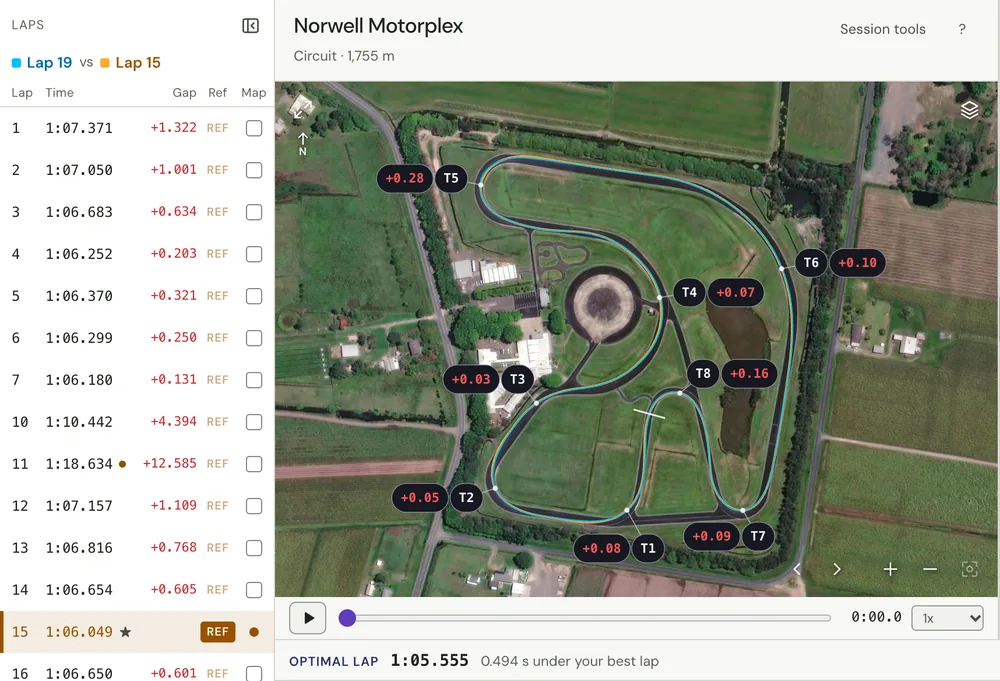
Compare your best lap with a typical lap from the same session, follow the time gap to the corners that cost most, then check your speed through them. A Solo 2 records GPS at 25 Hz with a 6-axis inertial platform; the Solo 2 DL adds the car’s own ECU data over CAN, RS232 or K-Line. See track day telemetry for beginners and optimal lap time.
Questions
What software does the AiM Solo 2 use?
Race Studio 3, AiM’s free software for 64-bit Windows. It sets up the logger, downloads sessions over Wi-Fi and analyses them.
Is there AiM Solo 2 software for Mac?
AiM’s desktop software, Race Studio 3, runs only on 64-bit Windows. AimMac is a free independent Mac app that downloads, sets up and analyses a Solo 2 over Wi-Fi, and browser tools such as Purple Sector open its .xrk files.
Is there an AiM Solo 2 app for iPhone?
AiM’s RaceStudio 3 app is free on the App Store and Google Play and downloads sessions from AiM devices, though its listing doesn’t name the Solo 2. Pushlapp names the Solo 2 and joins its Wi-Fi; LapSnap names it and connects to it directly.
How do I connect a Solo 2 to my computer?
Over Wi-Fi. AiM’s Solo 2 DL guide says it connects to the PC only via Wi-Fi: turn its Wi-Fi on, then select it from Race Studio 3’s Wi-Fi icon.
Can I export AiM Solo 2 data to CSV?
Yes. Race Studio 3 exports CSV on Windows, AimMac exports CSV and VBO, and Purple Sector exports the whole session as one CSV in the browser. See XRK to CSV.
More: How to read AiM Solo 2 data · Garmin Catalyst vs RaceBox vs AiM Solo 2 · MyChron software and apps · Race Studio 3 on a Mac · XRK to CSV
Sources, checked 23 October 2026
- Race Studio 3: 64-bit Windows only; Arm Windows not supported; virtualised Windows possible; on Arm, talking to the logger is unlikely: aim-sportline.com/docs/racestudio3/manual/html/faq.html
- AiM develops only for Intel x64: aim-sportline.com/en/sw-os-compatibility-table.htm
- Race Studio 3 is freely downloadable; the Solo 2 downloads over its integrated Wi-Fi: store.aim-sportline.com/en/lap-timers/23-solo-2.html
- "Solo 2 configuration can be made only using Race Studio 3 software": dwls.aim-sportline.com/doc/eng/solo2/Solo2_user_guide_eng.pdf
- Solo 2 DL connects to the PC only via Wi-Fi; Wi-Fi AUTO or ON; select it from the Race Studio 3 Wi-Fi icon; Download tab: dwls.aim-sportline.com/doc/eng/solo2/Solo2DL_user_guide_eng.pdf
- Race Studio 3 analysis: split report with best theoretical and rolling laps, overlaid channels, GPS track map, video sync: aim-sportline.com/docs/racestudio3/manual/html/analysis.html
- Race Studio 3 exports a session in Race Studio 2 .csv format: aim-sportline.com/docs/racestudio3/manual/html/analysis.html
- Solo 2: 25 Hz GPS on four constellations, 6-axis inertial platform; Solo 2 DL adds ECU data: aim-sportline.com/en/products/solo2-solo2dl/index.htm
- Solo 2 DL: ECU data over CAN, RS232 or K-Line: store.aim-sportline.com/en/lap-timers/37-solo-2-dl.html
- RaceStudio 3 app: free, iOS 18 or later; downloads sessions from AiM devices; lap times, charts, trajectories, split report; devices not named: apps.apple.com/au/app/racestudio-3/id6443408349
- RaceStudio 3 app on Google Play, free: play.google.com/store/apps/details?id=com.aim.racestudio
- AimMac: independent, free; Solo 2 and Solo 2 DL over Wi-Fi, original Solo by USB; firmware, configurations, settings; video, lap comparisons, sector splits, gauge overlays up to 5K; CSV and VBO export; macOS 14+, Windows 10 and 11 64-bit; Sergey Smirnov: aimmac.app
- Pushlapp: Inventivor B.V.; iOS 18+; Solo 2 and Solo 2 DL over Wi-Fi; theoretical best lap free; coaching insights; lean angle on a bike; Apex A$9.99 a month or A$99.99 a year: apps.apple.com/au/app/id6789864725
- Pushlapp on Google Play: play.google.com/store/apps/details?id=com.pushlapp.app
- LapSnap: AiM Solo 2; connects to the AiM device directly; optimal lap; lean angle for motorcycles; A$14.99 a month or A$149.99 a year: apps.apple.com/au/app/id1571767638
- Purple Sector opens .xrk and .xrz from Race Studio 3’s data folder as they are; .xrz is the compressed copy: purplesector.dev/guides/mychron-aim-xrk-files
- Purple Sector exports the whole session as CSV: purplesector.dev/guides/xrk-to-csv
- Purple Sector: first AI debrief free; packs from A$5.90 for 10; Coach A$19 a month: purplesector.dev/pricing